Your phone lines can't email you
when they break.
Monitor calls your numbers on a schedule, hears what answers, and alerts your team the moment a line stops working, with the recording to prove it.
A carrier change, a misconfigured route, a full mailbox: phone lines fail without warning, and the first report usually comes from someone who could not get through. By then the calls are already lost.
Common phone line failures.
The undetected outage
A carrier port, a SIP trunk problem, or a billing lapse leaves the main line ringing out, busy, or playing “this number is not in service.” No one inside the business calls their own number, so the outage can persist for days.
The broken menu
The line answers, but “Press 2 for scheduling” now goes to a dead end, a loop, or the wrong department after a phone-system update. Callers hang up.
The after-hours gap
The after-hours or emergency line is supposed to reach an answering service or voicemail. It has not been tested since it was set up.
The slow answer
Calls technically connect, but take so long to answer that callers give up.
Many locations, no visibility
A brand with 20 locations can have hundreds of numbers and no central view of which ones work today.
The cost
Missed appointments, lost leads, compliance risk on after-hours and emergency lines, and reputational damage that a monitoring tool could have prevented.
How it works
Add a number
Name it (“Front desk”), enter the number, and confirm your organization owns it or has permission to test it. Choose what should answer: anything, a voice, voicemail or attendant, or a fax machine.
Pick a schedule
Choose any interval from every 10 minutes (Enterprise) to once a day. Limit checks to set hours and days in the line's own timezone, so staffed lines are only checked during business hours.
Monitor calls it
Each check is a real phone call. Monitor listens to what answers, reads what a recording or attendant says, measures how long the answer took, and hangs up. If someone picks up, they hear a short, polite message explaining it's a test call and who to contact.
Failures are confirmed before alerting
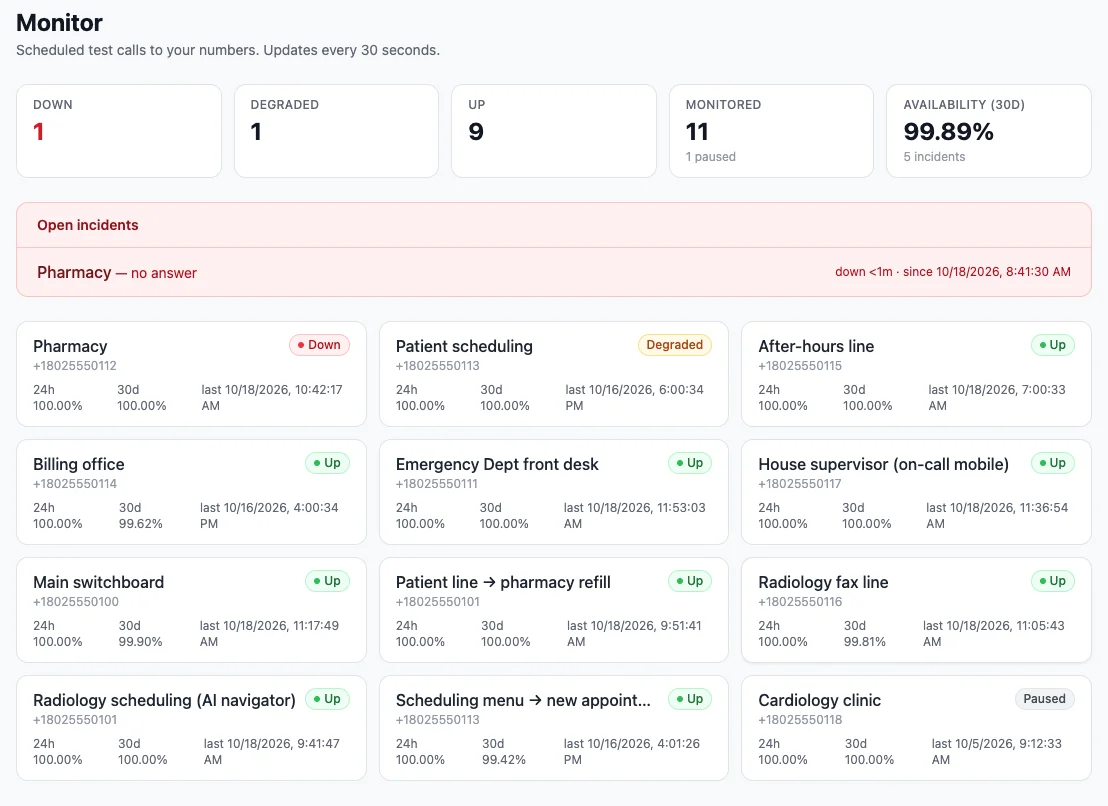
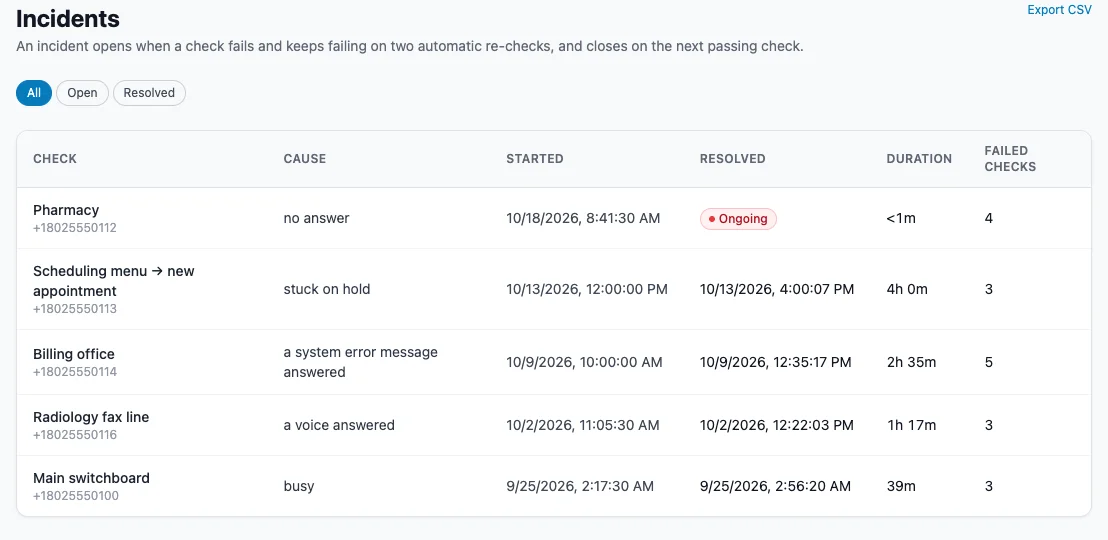
If a call fails, Monitor re-checks twice, two minutes apart. An incident opens only when all three calls fail, so a single dropped call never alerts anyone.
The right people hear about it
An email goes to up to 10 people per number. Enterprise can also page an on-call chain through CallSignal Escalate until someone acknowledges. A recovery email follows when the line works again.
See the record
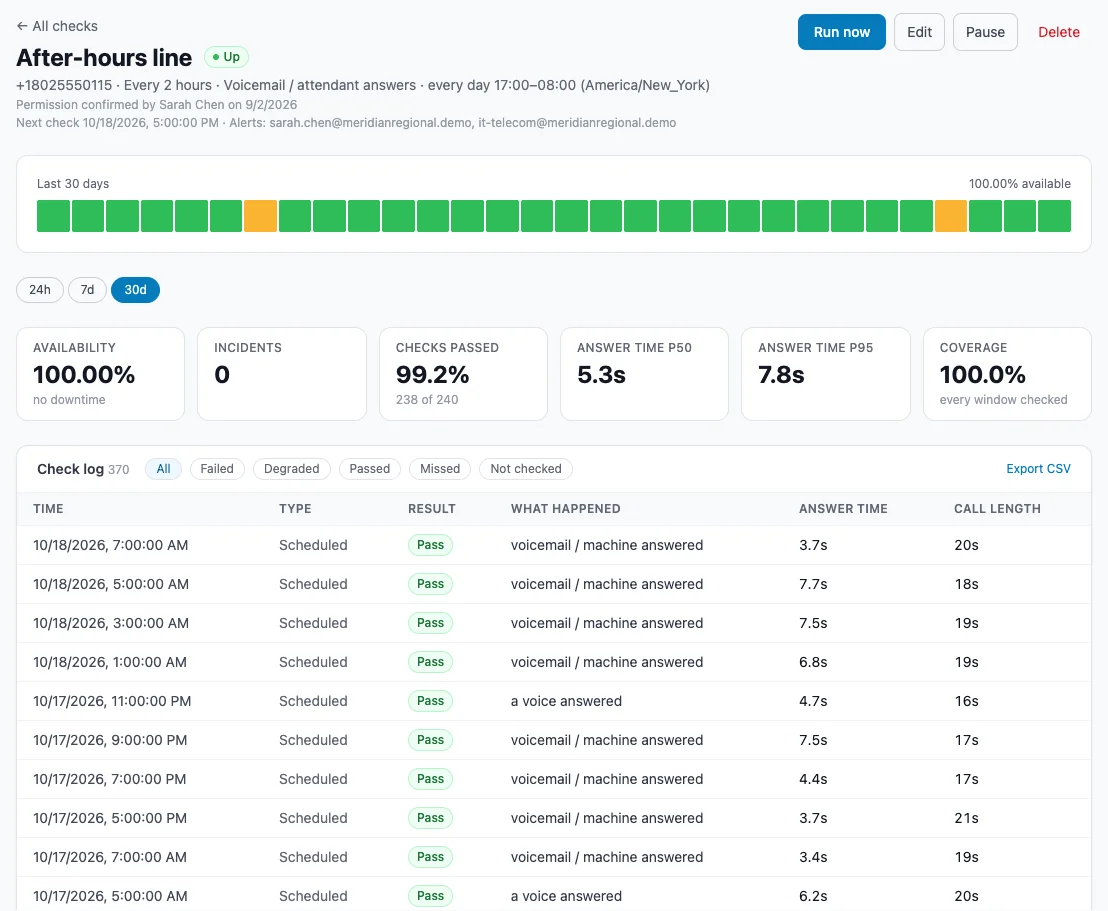
A dashboard shows every number's status and availability, with a 30-day history, full call log, and incident timeline. Weekly or monthly PDF reports can be emailed automatically.
Three kinds of check.
Answer check
All plans
Confirms the number answers, and answers the right way: anything at all, a voice, voicemail or attendant, or a fax machine. Catches no answer, busy, fax tones on voice lines, and slow answers. Monitor also reads what a recording says, so carrier error messages like “not in service” or “destination not configured” fail the check, and you can require words your greeting must contain. A daily in-service lookup catches disconnected numbers even when their recording sounds like an answer.
Menu journey
All plans
A scripted path through your phone menu: wait for the greeting, press keys, and optionally confirm a live person is reached at the end. Each expected prompt is verified against a transcript of the call, such as “didn't hear 'scheduling' after pressing 2.”
AI navigator
Enterprise
Give it a goal in plain words, such as “reach the billing department.” An AI listens to the menu and presses keys to reach it, then reports whether a person or the right recorded message answered. It flags when the menu path changes, loops, or has no matching option.
What teams put on watch.
The main line
Checked hourly. An incident and an email the moment it stops answering.
The after-hours line
Checked overnight only, and it passes only when the answering service or voicemail picks up.
After a migration
Every ported number checked on a schedule. Error recordings fail the check.
The menu
A daily journey that presses 2 and confirms billing answers.
The fax line
Passes only when a fax machine answers.
The MSP
One account watching every client's main numbers, with monthly availability reports to send them.
Alerts you can trust.
False alarms train teams to ignore alerts. Monitor alerts within minutes of a confirmed outage, and only then.
Confirmed before anyone is alerted
Every failure is re-checked twice, two minutes apart. You get one alert when a line goes down and one when it recovers. Repeated failures during an outage never spam the inbox.
Degraded is not down
An answer slower than the limit you set, or an unclear result, is marked degraded. It appears in reports but does not page anyone.
Our problems are never your outage
If CallSignal's own systems or call provider have trouble, those checks are recorded as “not checked,” never as failures. No alerts go out, every Monitor page shows a checks-delayed notice, and missed checks run again when it clears. A missed check is recorded as missed, never as a pass.
Something answered is not the same as working.
A line that plays “destination not configured” technically answers. Monitor reads what the recording says, so an error message is a failure, not a pass.
Against enterprise IVR-testing vendors
No sales cycle and no six-figure contract. Start with a card; move to Enterprise when you need 10-minute checks.
Against basic ring checkers
Monitor hears what answered. Error recordings fail the check, greetings can be required, menu paths are checked prompt by prompt, and every result has evidence.
Against website uptime tools
They don't call phones. Monitor does, with the same incident, alert, and report model teams already know.
Built to be trusted overnight
Re-checks before alerting, missed check windows recorded as missed (never as a pass), and when the problem is ours, no one is paged.
Availability reporting and SLA tracking.
Dashboard with every number's status (up, degraded, or down), open incidents, and 24-hour and 30-day availability
Per-number detail: 30-day availability bar, full call log with CSV export, and the incident timeline
Call evidence on menu journeys and AI navigator checks: recording, transcript, and step-by-step heard / not-heard results
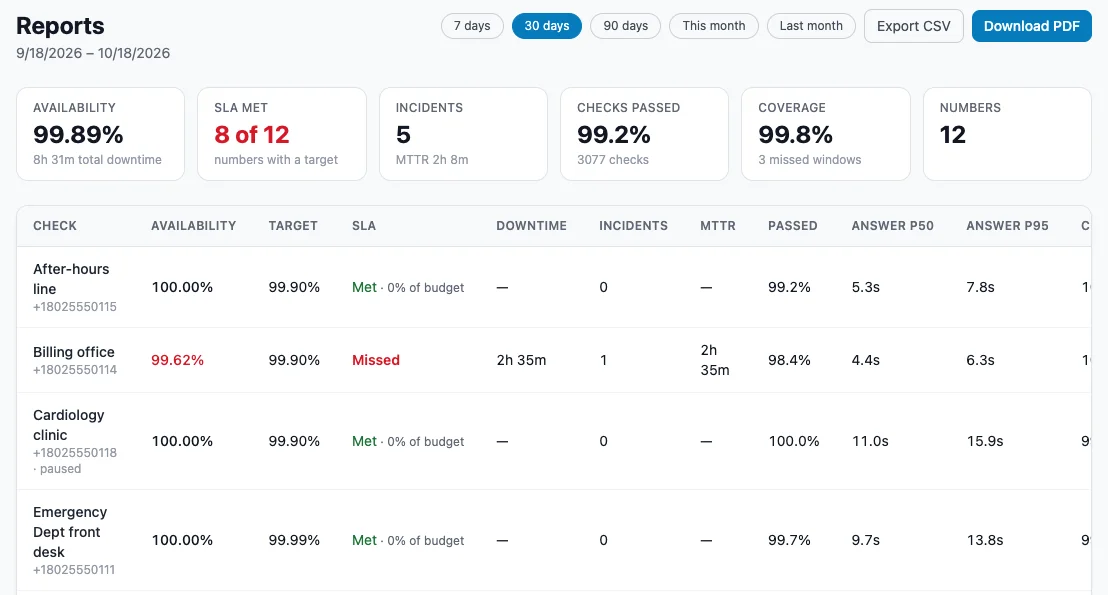
Availability reports for any period up to a year, covering availability, answer times, and mean time to recovery, as PDF or CSV
Scheduled weekly or monthly report emails to up to 20 recipients, on every plan
SLA targets and met/missed reporting (Enterprise)
Responsible by design.
Monitor places repeated automated calls, so it is built to be used only on numbers a business owns or is allowed to test.
Your numbers only
Monitor calls only numbers your organization owns, controls, or has written permission to test. Permission is confirmed when each number is added, and an Acceptable-Use Policy is accepted before the first check.
A permission record for every number
Each time a number is added or changed, Monitor records who confirmed permission, when, from where, and the exact statement they agreed to. Records are kept even after a check is deleted.
Extra care for mobile numbers
Monitor looks up each number's line type. Mobile numbers require the owner's agreement to test calls and are checked no more than hourly.
A courteous message, never a sales call
Anyone who answers hears a short message identifying CallSignal and who to contact. Voicemail gets no message. Enterprise can write its own message.
A platform-wide do-not-call list
A number on CallSignal's do-not-call list cannot be called by any customer or product, and any checks on it pause immediately.
Recordings only where needed
Menu journeys and AI navigator calls are recorded and transcribed so you can hear exactly what your callers hear. Answer checks record only long enough to read a greeting, then the audio is deleted. Recordings are visible only to roles allowed to see them.
More on how CallSignal approaches consent and logging in the Trust & Compliance center.
Every 10 minutes. And someone answers the page.
Monitor Enterprise checks as often as every 10 minutes, navigates menus with AI, reports against your SLA targets, and with CallSignal Escalate calls your on-call team until someone acknowledges the outage.
Plans
Monitor has no free trial, because every check is a real phone call. On-demand tests stop at the monthly allowance; there is no overage billing.
Starter
Watch a few key numbers every few hours.
- ✓ 1 monitored number
- ✓ Checks as often as every 4 hours
- ✓ 1 menu journey (checked daily)
- ✓ 20 answer and 5 menu on-demand tests per month
- ✓ Email alerts & PDF/CSV reports
Pro
Up to 4 numbers checked every 2 hours, with IVR journeys.
- ✓ 4 monitored numbers
- ✓ Checks as often as every 2 hours
- ✓ 2 menu journeys (checked daily)
- ✓ 100 answer and 10 menu on-demand tests per month
- ✓ Email alerts & PDF/CSV reports
Business
Up to 15 numbers checked hourly.
- ✓ 15 monitored numbers
- ✓ Checks as often as every hour
- ✓ 8 menu journeys (checked daily)
- ✓ 250 answer and 25 menu on-demand tests per month
- ✓ Email alerts & PDF/CSV reports
Enterprise
10-minute checks, Escalate alerts, AI IVR navigation, SLA.
- ✓ 20+ monitored numbers, sized to you
- ✓ Checks as often as every 10 minutes
- ✓ AI menu navigator
- ✓ On-call paging via CallSignal Escalate
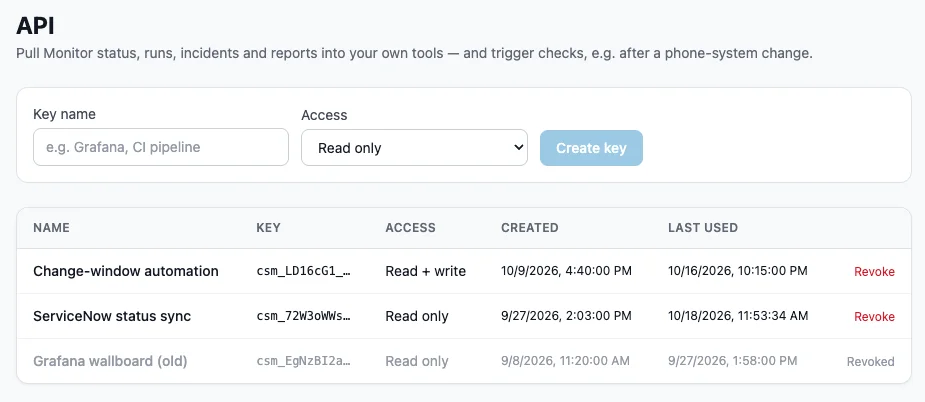
- ✓ SLA targets & reporting, custom answer message, API access
Monitor works with the rest of the suite.
Test it first with Attendant Assurance
Attendant Assurance tests a menu or AI attendant before a change goes live. Monitor then watches it around the clock.
Explore Attendant Assurance →Page the on-call team with Escalate
On Enterprise, a confirmed outage starts an Escalate workflow that calls your on-call chain until someone acknowledges.
Explore Escalate →Clean up the inventory with Verify
Verify documents what is on every line once. Monitor watches the numbers that matter from then on.
Explore Verify →Frequently asked questions
Does Monitor make real phone calls?
Yes. Every check is a real call to your number from CallSignal, which is why it catches carrier, routing, and phone-system problems that other tools miss.
What happens if one of my staff answers a test call?
They hear a short message: it's a test call from CallSignal to verify the line, with a name and number to contact. Enterprise customers can write their own message. Use active hours so staffed lines are only checked when it makes sense.
Will I get alerts for every dropped call?
No. Monitor re-checks a failure twice, two minutes apart, and only alerts if all three calls fail. You get one alert when a line goes down and one when it recovers.
What problems does it catch?
No answer, busy, numbers not in service, error recordings such as “destination not configured” or a full mailbox, fax tones where a voice should answer, answers that are too slow, greetings missing required words, missing menu prompts, menu options that no longer go where they should, and menus that loop or changed.
Can it check my phone menu (IVR)?
Yes. A menu journey follows the steps you define: listen, press keys, and confirm a person answers. Each expected prompt is checked against a transcript. On Enterprise, the AI navigator reaches a goal you describe in plain words and tells you when the menu path changes.
How often can a number be checked?
Every 4 hours on Starter, every 2 hours on Pro, hourly on Business, and as often as every 10 minutes on Enterprise. Menu journeys run daily on self-serve plans. Mobile numbers are checked at most hourly.
Can I monitor any number?
Only numbers your organization owns or controls, or has permission to test. You confirm this for every number, and we keep a record. Mobile numbers need the owner's agreement to test calls.
What if the problem is on CallSignal's side?
When the problem is on our side, or checks fail for many customers at once, failures are recorded as “not checked,” no incident opens, and every Monitor page shows a checks-delayed notice. Missed checks run again when it clears.
Are calls recorded?
Menu journeys and AI navigator calls are recorded and transcribed. Answer checks record only long enough to read a greeting, then the audio is deleted.
Can we export the data?
Yes. Reports and check logs export to PDF and CSV, scheduled report emails go out weekly or monthly, and Enterprise has an API.
Is there a free trial?
No. Every check is a real phone call. Start on Starter and upgrade any time.
Does it work with CallSignal Escalate?
On Enterprise, an outage can trigger your Escalate workflow so your on-call team is phoned until someone acknowledges, and paging stops when the line recovers.
Know your lines work before your customers find out they don't.
Monitor calls your own phone numbers on a schedule and alerts you the moment a line or menu stops working.